Foundry ComputerAvailable
Bring your own AI. Give it exactly your permissions.
Foundry Computer is a small program that lets the AI assistant you already run work in your Foundry business with exactly your permissions and no more. It is not a way to get an AI: Foundry never holds, stores, forwards or brokers your model provider’s key or session. The thinking is done by the assistant you already pay for. Foundry supplies the tools.
What it is, and what it is not
It is a small program on your machine. It is not a way to get an AI.
It speaks MCP over stdio to the assistant you already run, and calls Foundry’s own servers over HTTPS with your own agent credential. It holds no business logic: every decision about what your agent may read, do, or ask for is made by Foundry, not by this program.
It opens no listener. Not on localhost, not behind a flag, not ever. Its entire input and output is stdio in one direction and outbound HTTPS to your Foundry origin in the other, and its own tests assert that two ways: a scan of its source for anything that could bind a port, and a runtime check that starting it opens none.
Get a credential
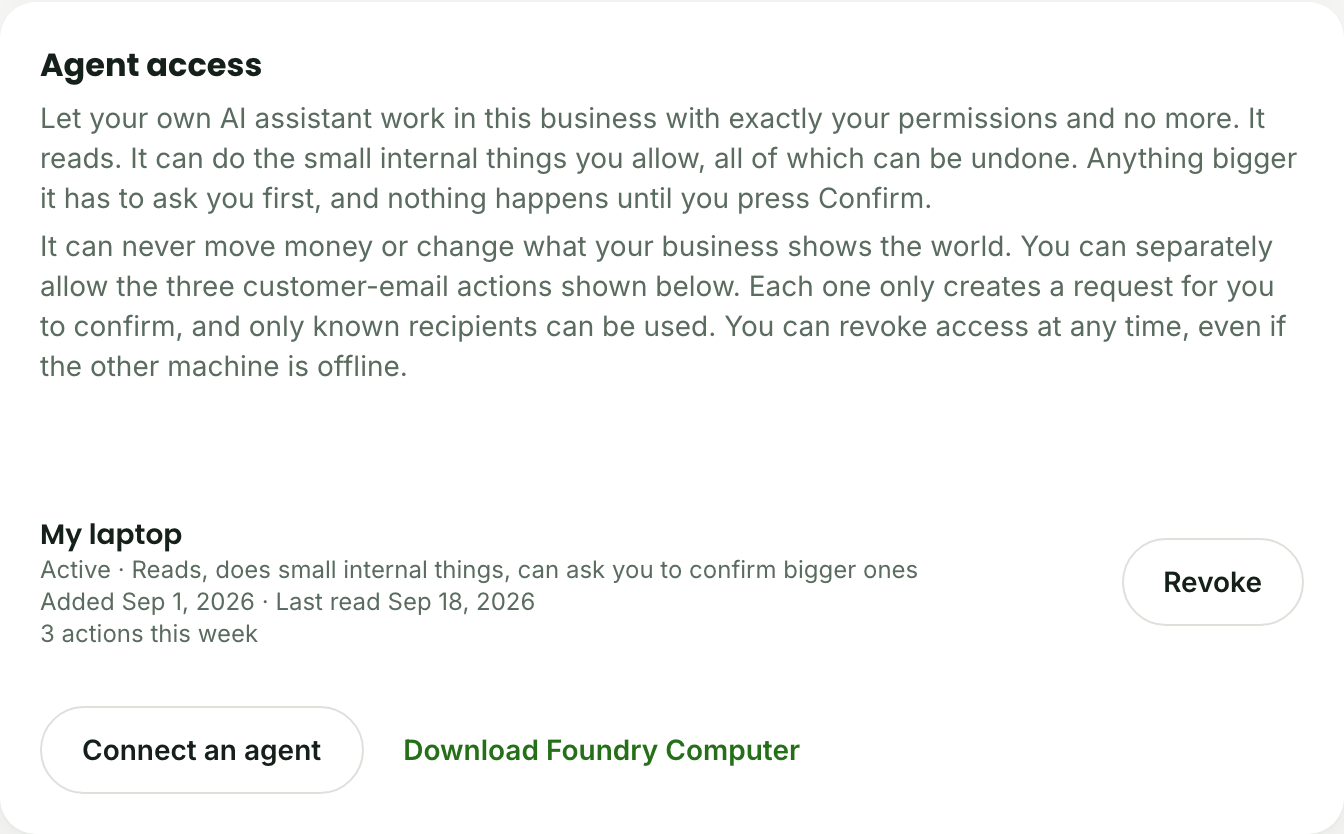
Profile, then Security, then Agent access.
Sign in to your Foundry business, go to Profile then Security, and find Agent access. The secret is shown once; Foundry keeps only a scrambled copy, so copy it then. You can revoke it at any time from the same place, even if the machine running it is offline, and a revoke takes effect on the very next call.
Download
One file. Built, not cloned.
The download is a pre-built package: unpack it, or install it globally, and it is ready to point an assistant at. Nothing inside it is a secret, and the same build run twice produces the exact same bytes.
- Version
- 0.0.1+6064552b
- Size
- 13.6 KB
- SHA-256
- 3a03636c75581f13eaff57e6a8acef37592f278de456d17132c1ab7b09c4adc1
Verify what you downloaded
shasum -a 256 foundry-computer-0.0.1+6064552b.tgzThe output should match the SHA-256 above, exactly.
This download is licensed under Apache 2.0. Using Foundry itself stays under the Foundry Terms of Service.
Add it to Claude Code
The form that was tested.
Point Claude Code at the program the download unpacks. Use the absolute path: a client starts the server from its own working directory, not from yours.
claude mcp add foundry \
  --env FOUNDRY_AGENT_CREDENTIAL=fdyagt_v1.<your credential> \
  --env FOUNDRY_ORIGIN=https://app.myfoundry.io \
  -- node /absolute/path/to/package/dist/bin.js
Installed the download globally instead of unpacking it by hand? The same program is already on your path as foundry-computer-mcp; point the last line at that command instead of at node and a path.
Cloud agents connect without a download
A door on the open internet, for the agents that need one.
A cloud-hosted agent cannot open a pipe to your laptop, and this download never opens one either. For that kind of agent, Foundry serves the same tools over the open internet instead: an MCP door for an MCP-native client, and an OpenAPI document for a function-calling one. Both carry the same credential, the same refusals, and the same confirm-and-wait ceremony as the download.
- Remote MCP door
- https://app.myfoundry.io/api/agent/mcp
- OpenAPI document
- https://app.myfoundry.io/api/agent/v1/openapi.json
Claude Code
AvailableWorks today, two ways: locally with the download below, or remotely, pointed straight at the public door with no download at all. Either way it gets the same tool list, the same refusals, and the same confirm-and-wait ceremony.
ChatGPT
Ready, untestedReachable two ways: as a custom connector over the public MCP door, or by importing the OpenAPI document below as a custom GPT Action. The MCP door itself is proven end to end; ChatGPT’s own Actions importer has not yet been tried against it.
Grok Bot
Ready, untestedReachable for the first time now that the public door exists: Grok Bot only ever spoke to remote MCP servers, and Foundry had none before it. No live connection from Grok Bot itself has been run yet.
Meta Muse
ComingNot yet. Meta’s Muse assistant would connect the same way Grok Bot does, over the public door below, once Muse itself speaks remote MCP. That support is not yet public, so nothing is connected today.
What your agent can do
Reads run. Small acts run. Anything bigger stops and asks.
The tool list your agent sees is exactly what your business is entitled to and your credential was granted, straight from Foundry: today that is 211 verbs across 35 capability groups, generated from Foundry’s own registry and never hand-typed. Reads run. Internal, reversible acts run if your credential carries that scope. Anything that changes something you would want to be asked about halts: Foundry states exactly what will happen and hands back an opaque id, and nothing is done until you press Confirm inside Foundry itself.
Your agent cannot confirm anything. There is no tool for it, deliberately: “the assistant showed me the sentence” is not something Foundry’s server can verify, so the press happens only on a surface Foundry drew, where Foundry knows a person pressed it.
Foundry refuses some verbs over this connection whatever your credential’s scopes say: anything touching money, anything that reaches outside your business or changes what it shows the world, and anything that would start real work the moment it was asked for. Those stay yours, in the app.
Security posture
No listener. No model key. Your permissions, and no more.
- It opens no listener, not on localhost and not behind a flag, and a runtime check proves it every time it starts.
- It never holds, stores, forwards, or brokers your model provider’s API key or session.
- It can only do what your credential was granted, which is never more than your own permissions in the business.
- You can revoke it at any time, from Foundry, even while the machine running it is offline, and it takes effect on the next call.
Foundry Computer is provided under the Foundry Terms of Service.